
Email Data Extractor
A hands-free pipeline that turns every incoming email into a clean, validated row in a Google Sheet — powered by Gmail, Claude, and n8n.
The inbox is a database — nobody treats it like one.
Every business runs on emails that contain structured data: orders, leads, applications, requests. But that data sits trapped in prose, waiting for someone to re-type it.
- Sales, ops, and finance teams manually re-typing the same data from emails into spreadsheets.
- Attachments and PDFs buried in threads, never captured in a system of record.
- Inconsistent formats — every sender writes 'quantity', 'qty', or 'units' differently.
- Hours lost every week just triaging the inbox before real work begins.
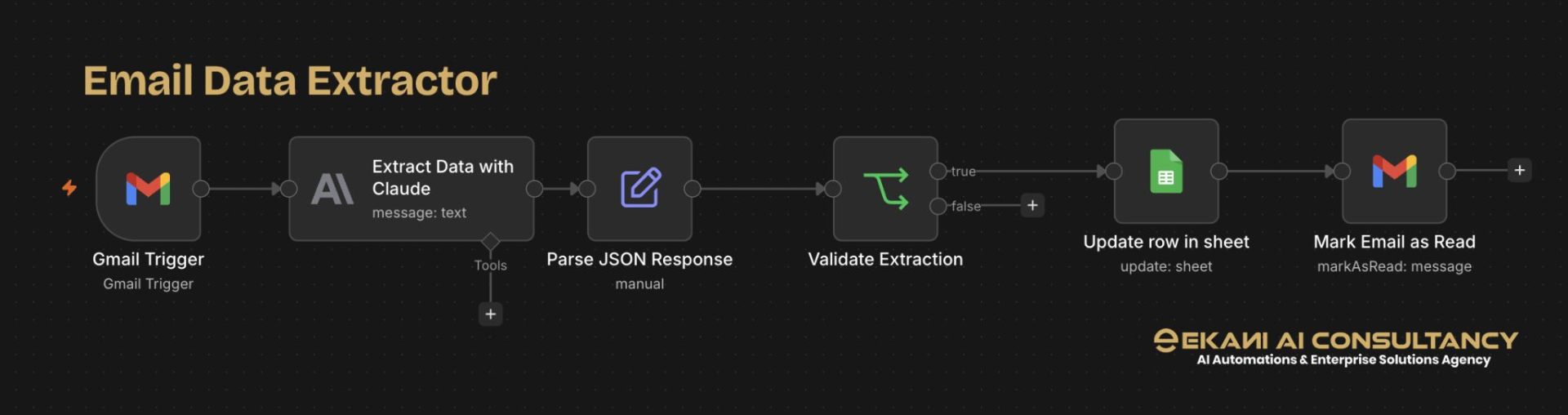
Six nodes. Zero babysitting.
Gmail Trigger
Watches a Gmail inbox and fires the workflow the moment a new message lands.
Extract with Claude
Claude reads the raw email body and pulls out the fields you care about as structured text.
Parse JSON Response
Manual JSON parsing normalizes Claude's output into a strict, predictable schema.
Validate Extraction
A true/false gate confirms every required field is present before anything hits your database.
Update Row in Sheet
Clean records are appended or updated in Google Sheets — one row per email, ready to query.
Mark Email as Read
The source email is marked read so nothing gets processed twice. Inbox stays clean.
Outcomes teams actually feel.
Tools, arranged with intent.
- Gmail APIInbox trigger + mark-as-read
- Anthropic ClaudeLLM extraction engine
- n8nWorkflow orchestration
- Google SheetsStructured data store
- JSON SchemaContract between AI and storage
One pattern. Endless use cases.
- Lead intake from web forms → CRM-ready rows
- Supplier quotes → pricing sheet
- Job applications → hiring pipeline
- Support tickets → triage log
- Invoices & receipts → finance ledger
- Event RSVPs → attendee tracker
Stop retyping. Start extracting.
Want this workflow adapted to your inbox and your schema? Let's map it out together.